



Does SOCD Help Counter-Strafing? Movement Priority Explained
SOCD is often shown beside fast peeks and clean movement clips, which makes it easy to assume that turning it on automatically improves counter-strafing. It does not.
SOCD changes how a keyboard resolves overlapping opposite directions. That can make direction switching more immediate, but the game still applies its own movement physics, and the player still has to choose the right moment to shoot.
The Opposite-Direction Problem
Consider a left-right movement pair: A and D. During a rapid change from left to right, the second finger may press D before the first finger has fully released A. For a short interval, both switches are active.
The keyboard or game must resolve that overlap. A neutral rule sends no direction while both are active. A last-input-priority rule sends the newer command, D. A first-input-priority rule keeps A active until it is released.
This is the core of SOCD. It is not a faster switch sensor by itself, and it is not a complete movement script. It is a rule for contradictory simultaneous inputs.
How Last-Input Priority Changes a Peek
Imagine that a player holds A to move out from cover and then presses D to return.

With neutral resolution, an A+D overlap creates a brief neutral output. The character stops receiving a directional command until one key is released.
With last-input priority, pressing D changes the output to D immediately even while A remains physically held. This can make the reversal more consistent when the player’s fingers overlap.
The key word is reversal. SOCD can reduce a pause caused by overlapping inputs, which may help a player move back behind cover sooner. It does not decide when the peek should end, and it does not compensate for poor positioning.
Does SOCD Perform a Counter-Strafe?
Not by itself.
Counter-strafing generally means applying an opposite movement input to reduce or redirect horizontal velocity before firing. The exact effect depends on the game’s acceleration, deceleration, input handling, and weapon-accuracy rules.
Last-input-priority SOCD can help the keyboard output the opposite direction as soon as the second key is pressed. That may assist the mechanical execution of a counter-strafe by eliminating an unintended overlap. However, it does not guarantee that velocity has reached the desired state when the shot occurs.
The player still controls:
- when to press the opposite direction;
- how long to hold it;
- when to fire;
- whether to continue moving or return to cover.
Calling SOCD “automatic counter-strafe” therefore overstates what the firmware does.
Why It Can Look Like There Was No Stop
Fast left-right changes can make a character appear to reverse without a visible pause. That does not mean the game skipped its movement physics. It means the input changed direction quickly and the neutral interval may have been very short or absent.
This can be useful for repeated strafes and evasive movement. It can also make shot timing harder for a player who used the old neutral interval as a cue. A cleaner input signal is not automatically an easier rhythm.
SOCD, Rapid Trigger, and Adjustable Actuation
These features are related in use, but they do different jobs:
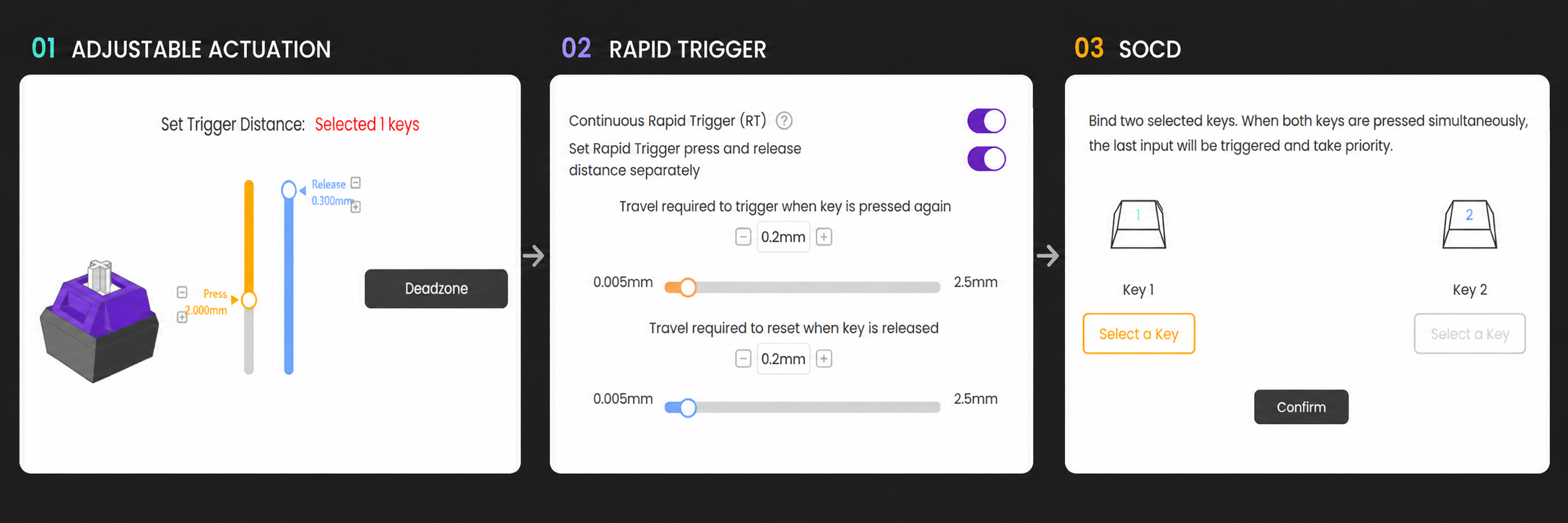
- Adjustable actuation sets the key depth at which an input becomes active.
- Rapid Trigger dynamically resets and reactivates a key based on movement rather than one fixed reset point.
- SOCD chooses which command wins when opposing inputs are active together.
Rapid Trigger can shorten the physical movement required to release and reactivate a magnetic switch. SOCD can resolve the overlap between the two directions. Combining them may create very immediate movement changes, but each setting introduces sensitivity that must be controlled.
What About Release-Triggered Opposite Inputs?
Some keyboard software offers a feature that sends the opposite direction when the original movement key is released. Names such as DKS may be used, but terminology and behavior are vendor-specific.
This is not the same as SOCD. SOCD resolves two simultaneously active directions. A release-triggered mapping creates an additional event from one key’s release.
It can create a repeatable opposite-direction pulse, but it may also trigger when the player only intended to stop or make a small correction. Conceptually, some DKS-style systems can build similar press-and-release mappings, yet exact timing and cancellation logic depend on the keyboard firmware.
Competitive Rules Matter
Hardware capability does not determine whether a feature is permitted. Valve’s August 2024 Counter-Strike 2 announcement states that players suspected of automating multiple player actions from a single input may be kicked from Valve Official Servers and advises disabling features such as Snap Tap before joining.
Rules can differ across games, matchmaking services, and tournaments, and they can change. Check the current policy before using SOCD or any release-triggered movement automation in competitive play.
SOCD can make opposite-direction switching more deterministic. Last-input priority lets the newer command win without requiring the older key to be physically released first. That can support fast peeks, evasive movement, and the input phase of a counter-strafe.
But SOCD does not perform the whole technique. It cannot choose the correct movement duration or fire at the correct accuracy window. It changes the keyboard’s decision during an overlap; the player remains responsible for the decision around it.