




Mouse DPI Explained and Why There Is No Universal Sweet Spot
Mouse DPI discussions often produce one magic recommendation: 400, 800, 1600, 3200, or an even higher number. The problem is that DPI does not operate alone. Cursor and camera movement depend on sensor resolution, operating-system behavior, in-game sensitivity, display and game resolution, and the game’s input implementation.
Higher DPI can provide finer count granularity when sensitivity is reduced to maintain the same overall turning speed. It does not automatically create lower click latency or better aim, and there is no universal 2500-DPI threshold that every player must cross.
In this article, we’ll clarify some common misconceptions about mouse DPI.
DPI Is Usually CPI
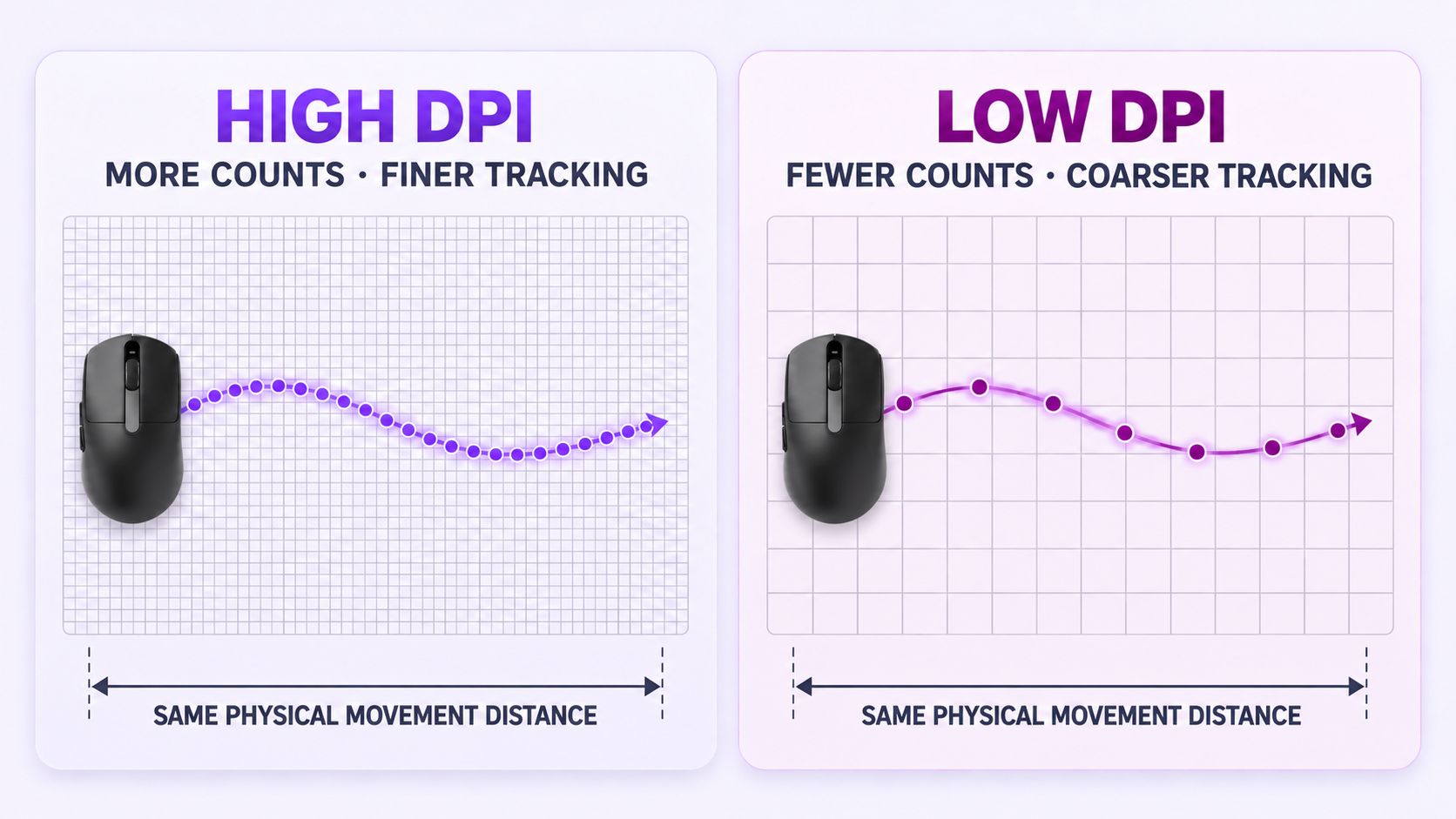
Gaming mouse software commonly uses DPI, or dots per inch. For a motion sensor, CPI, or counts per inch, is the more literal term: it describes how many motion counts the sensor reports when the mouse travels one inch.
At 800 CPI, one inch of movement ideally produces about 800 counts. At 3200 CPI, the same distance produces about 3200 counts. Those counts are then interpreted by the operating system or game.
DPI does not describe polling rate. CPI controls spatial granularity and sensitivity; polling rate controls how frequently reports can reach the host.
Understanding eDPI
Players use eDPI to compare effective sensitivity within the same game:
eDPI = mouse DPI x in-game sensitivity
For example, 800 DPI at sensitivity 0.5 and 1600 DPI at sensitivity 0.25 both produce an eDPI of 400. If the game scales input linearly, the same physical mouse movement should create approximately the same turn distance.
eDPI values should not be compared across different games unless their sensitivity scales are known to be equivalent. Field of view, resolution handling, zoom multipliers, raw-input behavior, and game-specific yaw or pitch constants can differ.
Why Higher DPI Can Improve Motion Granularity
At low DPI, each reported count represents a larger physical step. If in-game sensitivity is high, one count may rotate the camera by a visibly larger angle. This is sometimes described as coarse angular granularity or pixel skipping, although the visible result depends on the game, field of view, resolution, and sensitivity math.
Raising DPI while proportionally lowering in-game sensitivity produces more sensor counts for the same physical movement. Each count then represents a smaller camera rotation. This can make very slow mouse movements appear smoother and preserve more detail before the game applies sensitivity scaling.
The benefit is largest when the original combination is unusually low DPI and high in-game sensitivity. Once each physical movement is already represented by sufficiently fine counts, further increases have diminishing practical value.
Why Higher DPI Does Not Automatically Reduce Latency
DPI is not a report schedule. NVIDIA’s system-latency guidance explicitly separates sensitivity from polling and notes that higher DPI does not inherently mean lower latency.
A higher DPI can make a moving mouse generate counts sooner because less physical distance is needed for the first count. That is a spatial quantization effect, not a guaranteed reduction in the complete device-to-pixel latency. Sensor processing, firmware, polling rate, game sampling, rendering, and display scanout still dominate the pipeline.
Click latency is especially independent of tracking DPI. Changing DPI does not make the mouse button’s switch or debounce routine faster.
Why Extremely High DPI Can Be Unhelpful
Modern sensors advertise very high maximum DPI, but maximum capability is not the same as the best operating setting. At very high DPI:
- hand tremor and surface texture are represented by more counts;
- desktop navigation can become impractical unless software sensitivity is reduced;
- some sensor or firmware implementations may use interpolation, smoothing, or different processing at certain steps;
- configuration becomes more sensitive to small changes in game settings;
- the player may gain no useful precision after scaling the sensitivity back down.
These behaviors are product-specific. It is inaccurate to claim that all sensors become unreliable above 3200 or 4000 DPI, just as it is inaccurate to assume that a 30,000-DPI specification guarantees ideal tracking at every setting.
A Better Way to Find Your Most Suitable DPI Range
There is no universal sweet spot, but there is a repeatable selection method:
- Choose a practical starting DPI. Settings such as 800 or 1600 are broadly supported and easy to manage; 3200 can offer finer counts when the game allows sufficiently low sensitivity.
- Lower in-game sensitivity proportionally. Keep eDPI approximately constant.
- Test micro-adjustments and tracking. Include slow aim, fast flicks, recoil control, menus, and scoped sensitivity.
- Check for unwanted processing. Look for jitter, smoothing, inconsistent counts, or firmware-specific behavior at the selected DPI.
- Keep the lowest setting that already feels smooth and controllable. More counts are not valuable when they do not improve the task.
DPI is best understood as motion-count density. Higher DPI gives the system more counts per inch, and lower software sensitivity can convert those counts into finer angular steps. The improvement eventually diminishes, while very high settings can expose noise or implementation-specific processing.
Choose DPI as part of a complete sensitivity configuration. Preserve the same physical turn distance, test the exact mouse and game, and prefer repeatable control over a fashionable number.