





Why We Created the Air 01 — A Mac-First Philosophy
Does the World Need Another Mac Keyboard?
If you search online for a “Mac mechanical keyboard,” you will be inundated with results. The market seems utterly saturated with options promising smooth integration with your MacBook or iMac. So, why on earth did we decide to build another one?
The answer lies in a frustrating reality that long-time Apple users know too well: “Mac-compatible” is rarely the same as “designed for Mac.”
For years, the mechanical keyboard market has operated on a Windows-default mindset. Most “Mac” keyboards out there are simply standard Windows layouts with a Command icon printed on the Alt key and an Option icon on the Win key. Even if the software allows you to remap the functions, the physical layout often feels foreign. It doesn’t feel “Native.”
At Akko, our staff is a diverse mix. Many of our team members are die-hard Windows users and gamers, but our design team is comprised of heavy Mac users. They love the ecosystem, the aesthetics, and the workflow of macOS, but they were tired of compromising on their typing experience.
“We wanted the satisfying feedback of mechanical switches without sacrificing the muscle memory they’d built over years of using Apple devices,” says Mr. Shu, Akko’s Head of Design.
Driven by this internal demand, the Akko design team decided to create the Air 01. We realized that to create the perfect Mac mechanical keyboard, we couldn’t just adapt existing molds. We had to build it from the ground up. Our mission became clear: introduce a keyboard that isn’t just compatible with your Mac, but genuinely designed for it.
1. Reason 1: The “Native Layout” — Precision Matters
The biggest offender in the “Mac-compatible” market is layout misalignment. It might seem like a minor detail to Windows users, but for Mac power users, the exact placement of the modifiers is everything.
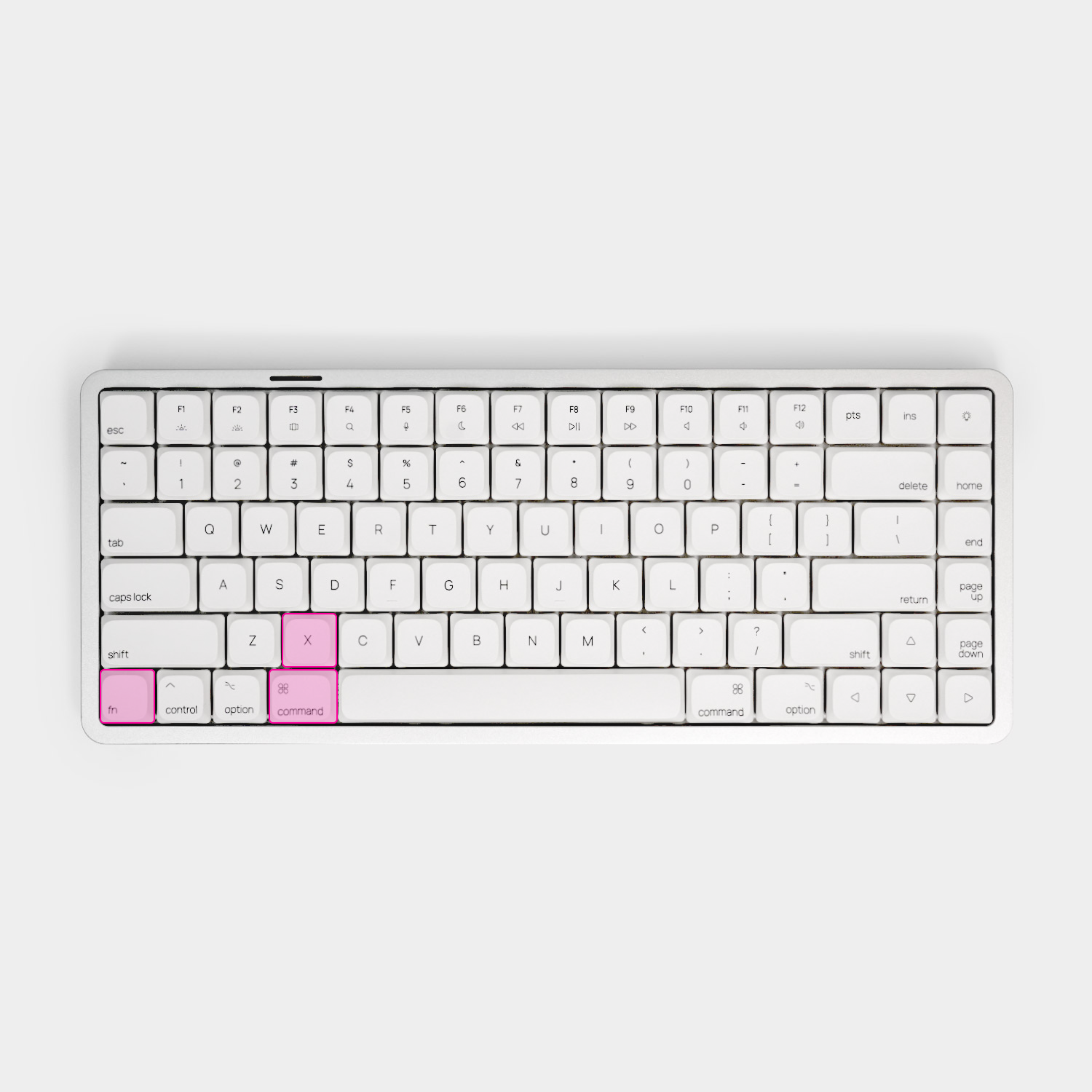
The crux of the issue is the Command-key alignment. On a true MacBook keyboard, the right edge of the Command key aligns almost perfectly under the middle of the “X” key. This allows your thumb to tuck comfortably under your palm for those constant copy, cut, and paste shortcuts (Cmd+C, Cmd+X, Cmd+V) without contorting your hand.
Most third-party keyboards use a hybrid mold where the “Alt” key (acting as Command) is shifted too far to the left, forcing an unnatural stretch that ruins years of built-in muscle memory.
We’ve seen the frustration online. The community knows that standard ANSI layouts just don’t feel right on macOS.
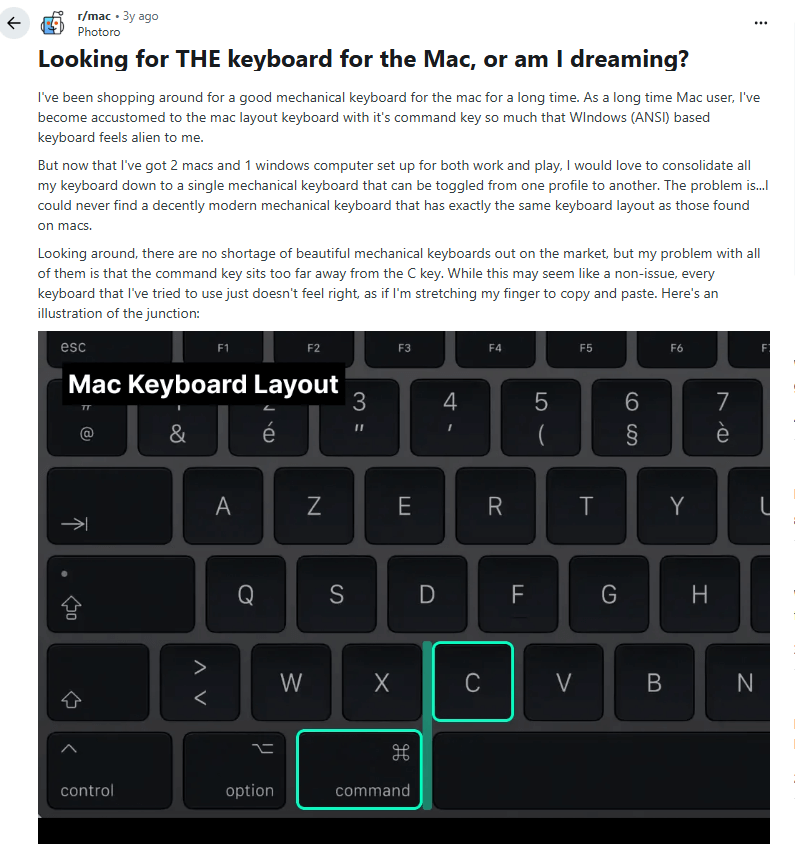
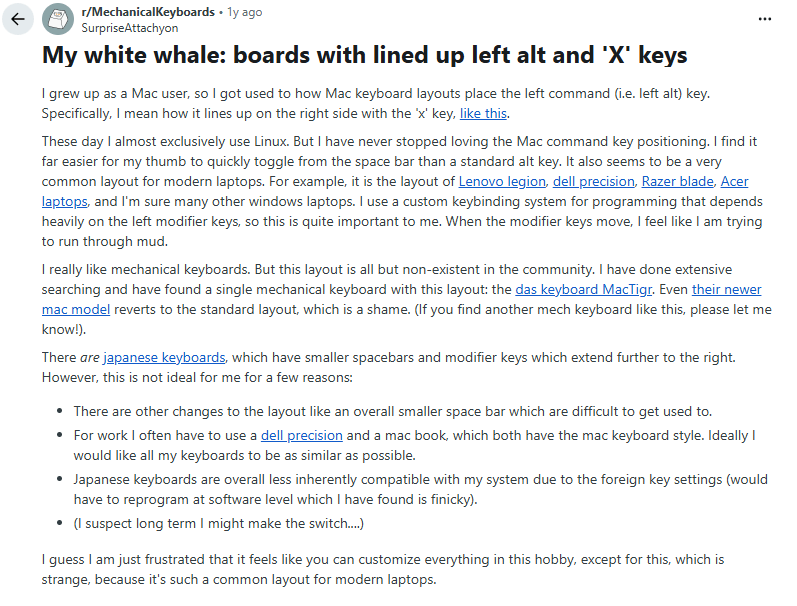
With the Air 01, we refused to compromise with a hybrid mold. We insisted on a true, Native Mac Layout. We ensured that the x and cmd line up exactly as you expect them to on an Apple keyboard. This ergonomic familiarity reduces finger strain and ensures that your productivity isn’t hindered by constant mis-hits on crucial shortcuts.
2. Reason 2: Mechanical Performance vs. Membrane Fatigue
At our core, Akko is a mechanical keyboard brand. While we have immense respect for Apple’s minimalist design philosophy, our deep expertise tells us that a mechanical keyboard offers a different and unique level of typing experience.
Traditional slim keyboards rely on membrane or scissor switches. To a mechanical enthusiast, these feel “mushy” and offer a harsh bottom-out that can lead to finger fatigue during marathon sessions. They lack the rhythmic, satisfying “pop” and the responsiveness that make a keyboard feel like an extension of your hands.
This is where our passion comes in. We didn’t want to just make another bulky mechanical board that clashes with the Mac aesthetic; we wanted to bridge the gap. By utilizing low-profile mechanical switches (yay…for the 1st time for Akko team), we brought the signature typing feel of a mechanical keyboard into a form factor that looks right at home next to a Magic Trackpad or a Studio Display. With Air 01, you no longer have to sacrifice the “soul” of a mechanical keyboard for a slim, modern desk setup.
3. Reason 3: Masterful Engineering in a Low-Profile Form
Creating a truly great low-profile keyboard is significantly more challenging than building a standard-height one. The Air 01 marks Akko’s first venture into the world of low-profile keyboards. While we already possess deep, industry-leading expertise in traditional mechanical boards, we knew that to truly honor the Mac aesthetic, we couldn’t just use our standard switches. We committed ourselves to the low-profile form factor because it is the only way to maintain the sleek, slim silhouette that Mac users demand.
To ensure this first step was a leap forward, we collaborated with Kailh, whose low-profile mechanical switches are widely regarded as the best in the industry. This partnership allowed us to provide a world-class typing foundation that fits perfectly within a modern, Mac-focused desktop.
However, the switch is only half the story. The real challenge is the stabilizers. Because low-profile keyboards require specialized stabilizers that differ from standard ones, the truth is, not many brands in the industry have spent much time optimizing low-profile stabilizers.
We took this challenge seriously. After testing a wide variety of molds specifically for this project. Our engineering team went as far as conducting dedicated lubrication and friction tests unique to low-profile tolerances to ensure every stroke feels smooth.
The result is an Akko-tuned stabilizer set designed specifically for the Air 01, aiming for a consistent, rattle-free, and smooth keypress—especially on the Spacebar.
4. Essential Features with a “Mac Priority”
While the Air 01 is unapologetically Mac-first, we ensured it meets the demands of a multi-device world.
The Air 01 features seamless tri-mode connectivity. You can connect via BT5.0, limitless 2.4G wireless, or wired USB-C. This allows you to switch instantly between your MacBook Pro, your iPad, and perhaps a PC gaming rig on the side.
We also acknowledge that some users operate in mixed OS environments. We provide Windows replacement keycaps in the box and a dedicated side toggle to instantly switch the keyboard’s internal mapping to Windows mode. It’s a versatile tool, but it never forgets its Mac DNA.
Conclusion: A New Standard for the Mac Desk Setup
Akko Air 01 isn’t just another peripheral thrown into a saturated market. It is a specialized keyboard designed for those who value the Mac ecosystem but want more than what’s currently available.
Ultimately, the reason we created this keyboard is simple: we didn’t just make a keyboard that “works” with Mac; we built the keyboard we desperately wanted to use ourselves.