





Mechanical Keyboard Switch Anatomy: Linear, Tactile and Clicky Explained
Mechanical keyboard switch names can be confusing. Colors once gave buyers a rough guide, but the market now includes hundreds of switches with different stems, springs, travel distances, contact systems, and sound mechanisms.
The useful way to compare them is not by name. It is by structure. Once you understand what happens inside a switch, specifications such as actuation force, pre-travel, total travel, and spring length become much easier to interpret.
The Main Parts Inside a Mechanical Switch
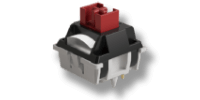
A conventional MX-style mechanical switch usually contains six functional parts:
- Top housing: Guides the stem and keeps the switch assembly together.
- Stem: Moves vertically when the key is pressed. Its cross-shaped mount holds an MX-compatible keycap.
- Spring: Resists the press and returns the stem after release.
- Moving contact leaf: A flexible metal contact that changes position as the stem moves.
- Stationary contact leaf: The second electrical contact.
- Bottom housing: Supports the internal parts and connects the switch to the PCB.

At rest, a feature on the side of the stem holds the moving contact away from the stationary contact. As the stem travels downward, the moving leaf is released. The two contacts meet, closing the circuit and registering the keypress. When the key is released, the spring pushes the stem upward and the contacts separate again.
This description applies to a common contact-based MX-style switch. Optical, Hall Effect, TMR, capacitive, and other contactless switches detect movement differently.
Linear Switches: A Continuous Keypress
On a linear switch, the contact-facing surface of the stem is shaped to move past the leaf without creating a distinct bump. Resistance generally increases as the spring is compressed, but there is no intentionally added tactile event before bottom-out.
CHERRY MX Red is a familiar reference point: CHERRY specifies a linear feel, 45 cN operating force, 2.0 mm pre-travel, and 4.0 mm total travel. Those figures are not universal. Modern linear switches can be lighter or heavier, and many use shorter travel.
Linear switches are popular for gaming because repeated presses and direction changes can feel smooth. They are also widely used for typing. The category describes the force feedback, not the task a switch is “for.”

Four Specifications That Matter
1. Total Travel
Total travel is the distance from the switch’s resting position to bottom-out. A shorter total travel reduces the maximum movement, but it does not automatically make a keyboard better for gaming. Some users prefer the control and rhythm of a longer stroke, while others prefer a shorter one.
2. Pre-Travel or Actuation Travel
Pre-travel is the distance the stem moves before the switch actuates. A shorter value means less finger movement is required to reach the electrical contact point.
That can make a key feel more immediate, but it is only one part of latency. The keyboard’s scan rate, debounce method, firmware, USB polling behavior, and the computer and game pipeline also affect when an action appears on screen. A short actuation distance can also increase accidental presses if the switch is very light or the user rests heavily on the keys.
Silver switches are a common example of this design. They typically feature short pre-travel for quick actuation, making them particularly well suited to gaming, where fast and repeated inputs are often important. The Akko Creamy Silver U1, for instance, requires relatively little downward movement to register an input, giving it a fast and responsive feel.

3. Operating Force
Switch force is commonly listed in gram-force (gf) or centinewtons (cN). One gram-force is approximately 0.9807 cN, so the numbers are close but not identical.
Operating force describes the force around the actuation point. It should not be confused with initial force, tactile peak force, or bottom-out force. A switch can share the same operating-force rating with another switch and still feel very different across the full stroke.
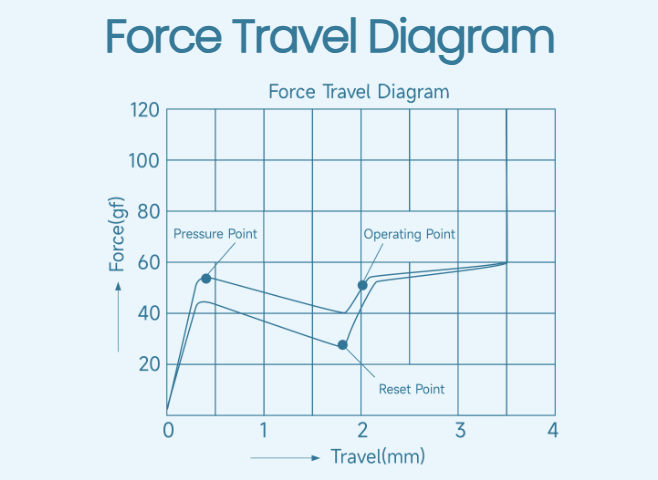
4. The Force Curve
A single force number cannot describe the entire keypress. The force curve shows how resistance changes with distance. Spring rate, preload, stem geometry, lubrication, friction, and tactile mechanisms all shape that curve.
This is also why statements such as “long springs are always more even” are too simple. A longer spring often allows a designer to use more preload and tune the difference between starting and bottom-out force, but wire diameter, coil count, material, and geometry matter too.
Tactile Switches: Feedback Without a Mandatory Click
In many MX-style tactile switches, a shaped leg on the stem moves across the contact leaf. The interaction creates a temporary rise and drop in resistance: the tactile bump.
The bump can be early or late, rounded or sharp, subtle or strong. Terms such as “light tactile” and “heavy tactile” are useful community descriptions, but they are not universal engineering categories. Two switches marketed as tactile can have very different peak forces and bump shapes.
A tactile switch does not have to be loud. Most of its sound still comes from the stem, housing, spring, keycap, plate, case, and the speed of the press and return. The tactile event provides physical feedback; an added click mechanism provides an intentional click sound.
Clicky Switches: More Than One Mechanism
Some classic clicky MX-style switches use a moving click component around the stem. During the downstroke, that component snaps past a point in the mechanism, producing both tactile feedback and a click. The return stroke can produce another audible event.
Other clicky switches use a click bar: a small metal bar is deflected by the stem and then snaps back. This separates much of the sound-and-feel mechanism from the main electrical contact system. Click bars often produce a crisp click, but pitch and loudness still vary by switch and keyboard construction.
The important distinction is that clicky describes the experience, not one universal internal design.
Contacts, Springs, and Light Guides
Contact Materials
The tiny contact points repeatedly close and open the electrical circuit. Manufacturers may use gold or gold-alloy contact surfaces because gold resists corrosion and provides stable conductivity. However, durability depends on the complete contact design, material stack, manufacturing quality, electrical load, and contamination control, not the word “gold” alone.
Spring Design
Spring length is visible and easy to market, but it is not enough to predict feel. A designer can tune:
- initial force at rest;
- force at actuation;
- bottom-out force;
- return force;
- the rate at which resistance increases.
Long springs are often used to create stronger preload and a more assertive return. Multi-stage springs can alter the force progression further. The best guide is a complete force-travel curve plus actual typing experience.
RGB and Light Diffusion
Transparent housings, open LED slots, and light-guide structures can distribute PCB lighting more evenly toward the keycap. They affect lighting appearance, not the electrical sensing principle. Results also depend on LED orientation, plate openings, keycap material, and whether the legends are translucent.
How to Choose a Mechanical Switch
Start with the feedback you want: linear, tactile, or clicky. Then compare operating force, tactile peak, pre-travel, total travel, bottom-out force, and noise. Also check PCB compatibility, pin count, LED clearance, and keycap mount.
For a shared office, sound may matter more than a small travel difference. For gaming, a light or short-travel switch may feel responsive, but accidental inputs and the rest of the keyboard’s latency still matter. For long typing sessions, the most comfortable force curve is personal.
A switch name is branding. Its structure and force curve tell you what your fingers will actually experience.
Mechanical switches are small systems, not colored labels. The stem controls movement and often contact timing; the spring shapes resistance and return; the contacts register the input; and optional tactile or click mechanisms create feedback.
Once those pieces are separated, switch shopping becomes less mysterious. Instead of asking whether one fashionable switch is “best,” ask whether its mechanism, force curve, travel, sound, and compatibility match the way you use a keyboard.