



Linear vs Tactile Switches for Gaming: What Actually Changes?
Linear switches are often marketed as the gaming option, while tactile switches are more often linked to typing. That does not make one a gaming switch and the other a typing switch. The difference is what you feel as the key moves: a linear switch stays smooth through its travel, while a tactile switch has a bump you can feel.
That bump changes the feel under your fingers, not the keyboard’s response time by itself. Whether it helps comes down to the keys you use, how you press them, and whether you prefer a physical cue during each press.


What Is a Linear Switch?
On a linear switch, resistance builds as the spring compresses, but there is no deliberate bump during the press. In a conventional mechanical switch, the contacts close at a set point. In a magnetic switch, a magnet moves past a sensor, and compatible firmware can set the actuation point.
That smooth movement is one reason linears are popular for games with frequent movement inputs. Tapping and releasing W, A, S, or D feels consistent because there is no bump to cross on each press. Some players also find a linear switch lighter than a tactile switch with a similar stated spring force.
Smooth travel alone does not make a keyboard faster. Scan behavior, firmware, debounce or sensing, USB report rate, and the player’s own finger movement all affect the time between a press and the game receiving it.
What Is a Tactile Switch?
A tactile switch changes resistance at a noticeable point in the key’s travel. In many mechanical designs, the stem presses against a metal leaf to create the bump. It can be subtle or pronounced, and its position varies by switch.
The bump gives your finger a cue that the key has moved through a certain point. Some players like that on keys they press deliberately, such as push-to-talk, abilities, or inventory shortcuts. It may also change how often you bottom out, but that depends on your technique and the switch itself.
The bump and the electrical actuation point are related, but they are not necessarily the same. Feeling the bump does not tell you exactly when the keyboard sends the keypress.
Force Curves Explain More Than Color Names
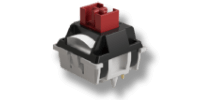
Switch colors are not standardized across brands. One manufacturer’s red linear may feel quite different from another’s, just as brown tactiles can vary. Spring weight, travel, materials, lubrication, and the force curve all affect the feel.
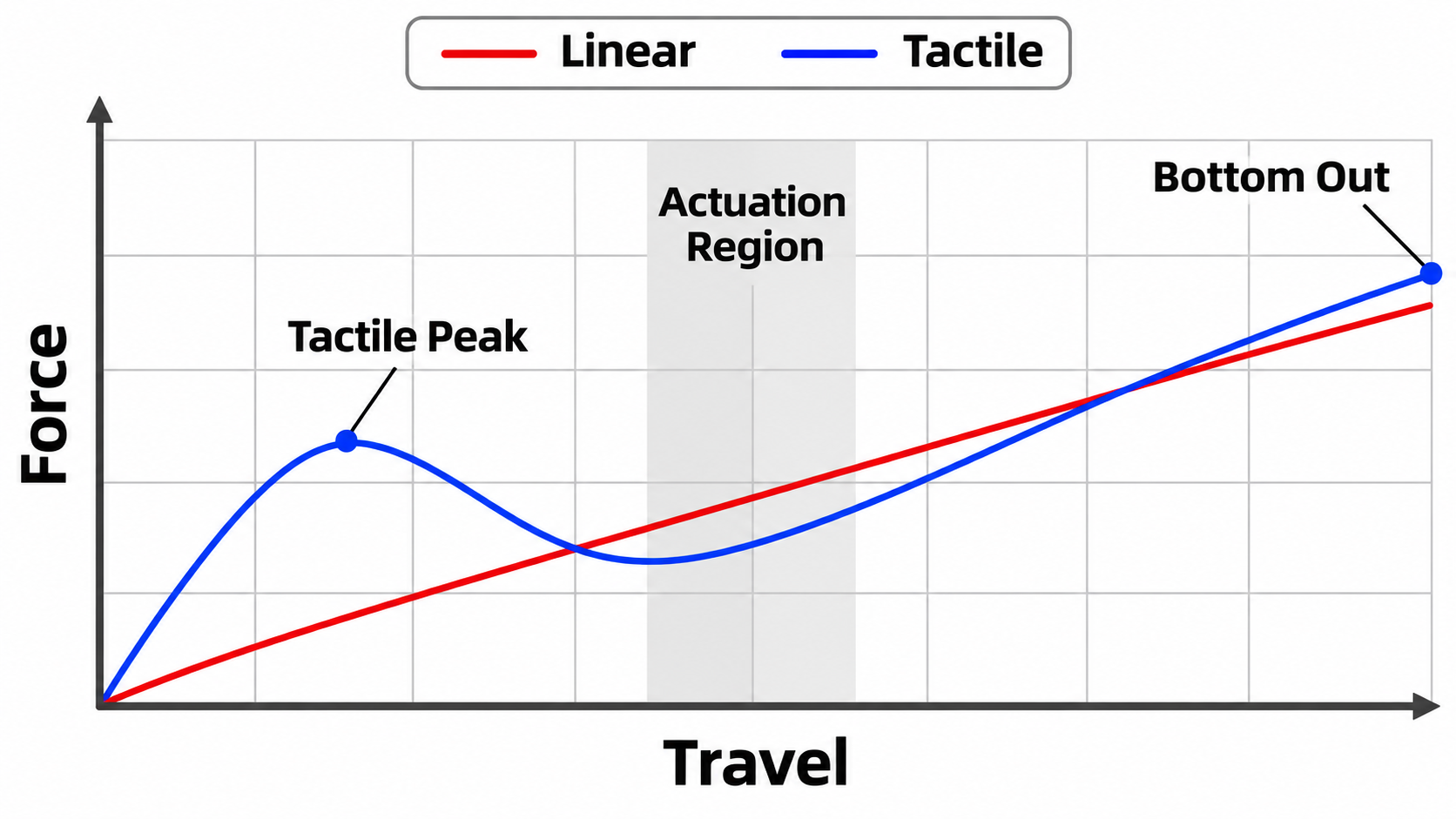
A force curve shows how much force a key needs as it moves. A linear switch usually has a steady rise in resistance. A tactile switch rises to a peak at the bump, drops as the stem passes it, then rises again as the spring compresses. That is why two switches with the same advertised operating force can feel quite different.
When comparing force curves, look at:
- initial force: how much pressure starts the key moving;
- peak tactile force: the resistance you feel at the bump;
- spring progression: how resistance changes toward bottom-out;
- total travel and bottom-out force;
- the position and shape of the tactile bump.
A lighter spring takes less force to press, but it can also make accidental inputs more likely if you rest your fingers heavily on the keys. You may find yourself hovering above them or working harder to avoid unwanted presses. Control matters as much as the force number.
Why Linear Switches Are Common in Gaming Keyboards
Linears are popular on gaming keyboards because the press feels consistent from top to bottom. If you tap movement keys repeatedly or change direction often, you may prefer not to feel a bump on every press. That is a preference, though; tactile switches can work just as well for players who like their feedback.
Linears are also the usual choice for magnetic-switch keyboards. A magnetic sensor tracks the magnet’s position, allowing firmware to offer adjustable actuation or Rapid Trigger. With a smooth linear mechanism, the key moves predictably through the software-defined actuation and reset points.
Tactile magnetic switches are possible. The design challenge is placing the physical bump in relation to the actuation and reset points set in software. If those points fall before or after the bump, the key may send an input at a point that does not match what your finger feels. The added resistance may also be less appealing to players who choose magnetic switches for quick, repeated movement.
A tactile magnetic switch can still make sense, but the bump needs a clear purpose and should work with the keyboard’s actuation settings.
Where Tactile Switches Can Make Sense in Games
Not every key on a gaming keyboard has the same job. Smooth, repeated movement may suit linear switches, while a key for push-to-talk, an ability, or an inventory shortcut may feel better with a tactile bump. Tactile switches suit players who want that physical cue and do not mind the added resistance.
Tactile switches can also be a good fit if you use one keyboard for gaming and writing. They give each press more physical feedback without the click mechanism found in clicky switches.
Game genre is a poor way to choose a switch. A tactical-shooter player may prefer tactiles, while someone playing strategy games may prefer linears. Pay more attention to your keybinds, hand position, and what feels comfortable over a long session.
Accidental Presses, Fatigue, and Control
Very light linear switches can register when you rest your fingers heavily on the keys. On a magnetic keyboard with adjustable actuation, setting a deeper trigger point may help. A slightly heavier spring can also reduce accidental presses on mechanical or magnetic switches, though it takes more effort to press.
Some players find the resistance of a tactile bump easier to control; others find repeated bumps tiring. Heavy linear springs can cause fatigue too, especially if you bottom out on every press. There is no spring weight that works for everyone.
Before choosing, try the switch with the keys you use most and check three things:
- Can you rest your fingers on the keys without triggering them?
- Can you tap and release movement keys comfortably?
- Does the switch still feel comfortable after a long session?
How Switch Design Affects Sound
Switch type does not determine volume. Linear and tactile switches can both be quiet or loud. Sound comes from the whole assembly: the stem, housing, spring, lubrication, impact surfaces, plate, keycaps, stabilizers, and case.
Some magnetic keyboards have a sharper, higher-pitched sound. That often comes from the switch’s bottom housing and the keyboard’s plate; many use rigid aluminum plates. Newer magnetic designs use more enclosed or better-controlled bottom housings to soften that sound.
Choosing Between Linear and Tactile
Choose linear if you prefer a smooth press and spend a lot of time tapping movement keys. Try tactile if you want a physical cue on each press or use the same keyboard for gaming and writing. Neither type will improve aim or lower latency on its own. Switch weight, actuation point, keybinds, and comfort matter more.
For magnetic keyboards with adjustable actuation and Rapid Trigger, linear switches remain the more common fit because the key moves smoothly through the software-defined trigger and reset points. On a conventional mechanical keyboard, either type can work well. Silent switches are another option if reducing noise is a priority.
If you can, test the switches with your usual keybinds instead of choosing by color or by a gaming label.